2 min
How MCP Tools Work
A walkthrough of how an AI agent interprets a natural language query and maps it to a structured MCP tool call.
views
| comments
MCP (Model Context Protocol) defines a standard way for AI agents to discover and invoke tools. Instead of hardcoding logic, the agent reads a tool definition at runtime and figures out how to call it based on the user’s intent.
The Flow#
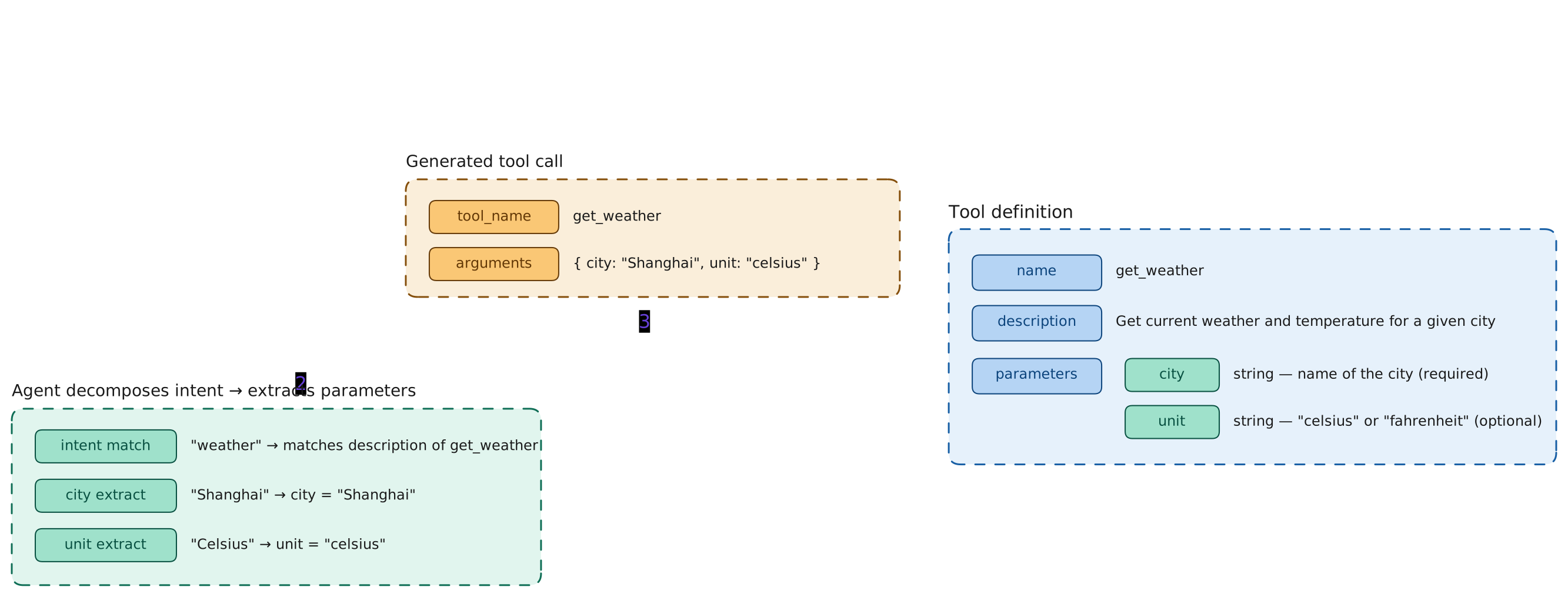
The diagram below shows the full cycle for a simple weather query.
1. User sends a natural language query#
"What's the weather like in Shanghai today? Show me in Celsius."2. Agent decomposes intent and extracts parameters#
The agent matches the query against available tool descriptions:
| Step | Result |
|---|---|
| intent match | "weather" → matches description of get_weather |
| city extract | "Shanghai" → city = "Shanghai" |
| unit extract | "Celsius" → unit = "celsius" |
3. Agent reads the tool definition#
The tool definition tells the agent exactly what it needs to call the tool:
{
  "name": "get_weather",
  "description": "Get current weather and temperature for a given city",
  "parameters": {
    "city": "string - name of the city (required)",
    "unit": "string - \"celsius\" or \"fahrenheit\" (optional)"
  }
}4. Agent generates and executes the tool call#
{
  "tool_name": "get_weather",
  "arguments": { "city": "Shanghai", "unit": "celsius" }
}The tool runs, returns the result, and the agent formats it into a natural language response.
Why This Matters#
The agent never needs to know the implementation of get_weather. It only needs:
- A description good enough to match intent
- A parameter schema to know what to extract
This separation is what makes MCP tools composable — you can add new tools without changing the agent.